Guide
Build a custom OSA tool with Claude or Cursor
Claude or Cursor runs the example from GitHub. You paste a prompt, put your API key in the app page (not in the chat), then upload a PDF.
Example app
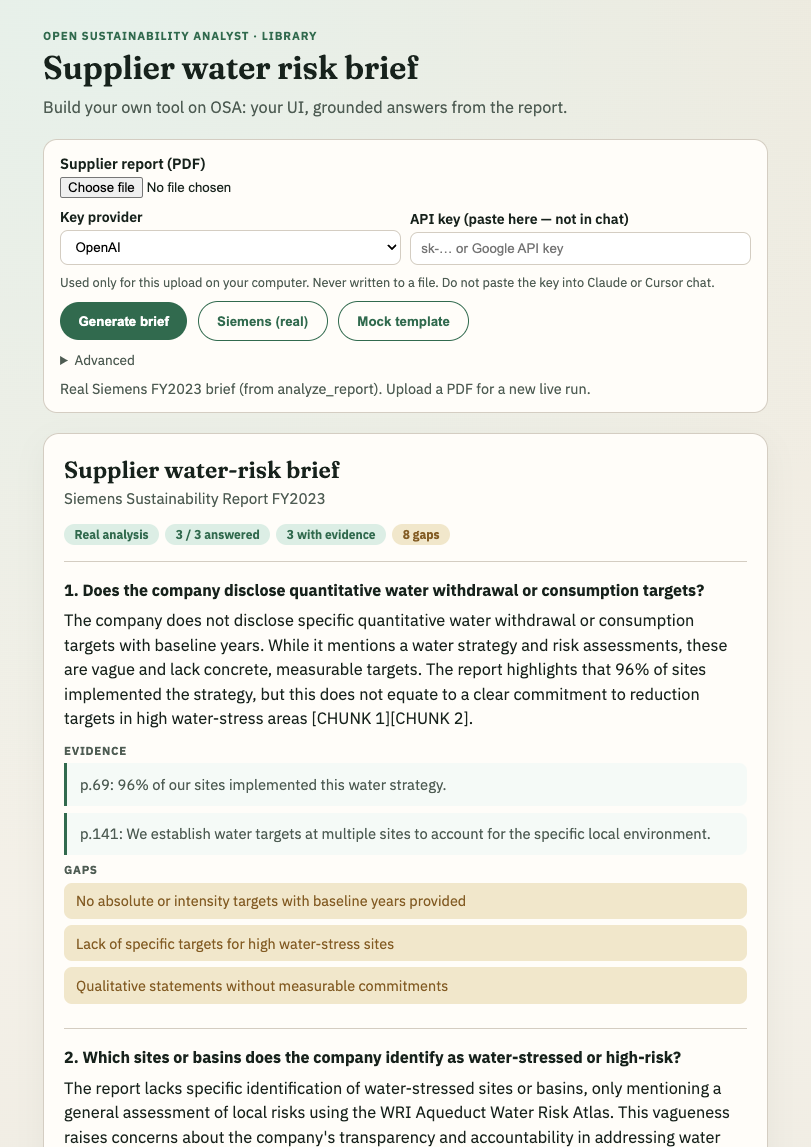
This is what you get: a small page that screens one sustainability report for water risk. Below is a real Siemens FY2023 run. Each answer shows evidence from the PDF and what is missing.
Steps
You stay in the chat. Claude or Cursor pulls the code from GitHub and starts the example for you.
-
Open Claude, Cursor, or Copilot Chat
Any of these is fine. You will paste a prompt into the chat.
-
Paste this prompt
It points Claude at the public GitHub repo and the example folder inside it.
Open the GitHub repository https://github.com/climateandtech/report-analyst
and follow the osa-library-host-app skill in that repo (.claude/skills/osa-library-host-app).

1. Use the example at examples/grounded_topic_brief in that repository. Do not rebuild the Streamlit OSA app.
2. Start the example and open it in my browser when it is ready.
3. Do not ask me to create a .env file.
4. Do not ask me to paste my API key into this chat.
5. Tell me to paste my OpenAI or Google API key only into the API key field on the app page, then upload a PDF.

Keep the UI simple: PDF upload and a brief that shows answer, evidence, and gaps.
Repo: github.com/climateandtech/report-analyst · skill folder: osa-library-host-app.
-
Get an API key
Live analysis needs an OpenAI or Google key. Follow the screenshots: how to create an OpenAI key. For Google, use Google AI Studio.
Or paste this into Claude and ask it to guide you:
I need an OpenAI or Google API key for the OSA example in https://github.com/climateandtech/report-analyst. Walk me through creating the key. Do not ask me to paste the key into this chat. When I have it, tell me to paste it only into the API key field on the app page.
When you have the key, keep it out of the chat. You will paste it on the app page next.
-
On the app page: key, then PDF
When Claude opens the example in your browser, choose OpenAI or Google, paste the key into API key, pick a PDF, click Generate brief. You do not need a
.envfile. -
Read the brief
You should see answers with quotes from the report and a list of gaps. If you want a different topic or look, ask Claude in the same chat.
Developers
Same example if you want to run it from a terminal. Prefer the API key field on the page so the key is not stored in shell history.
report-analyst on GitHub · examples/grounded_topic_brief · Library guide
git clone https://github.com/climateandtech/report-analyst.git
cd report-analyst/examples/grounded_topic_brief
pip install -r ../../requirements.txt fastapi uvicorn python-multipart
PYTHONPATH=../.. python app.py
# open http://127.0.0.1:8765 and paste the API key on the page
Optional: export OPENAI_API_KEY=… before starting the app.
FAQ
- Where do I get an API key?
- Use our OpenAI key screenshots, or create a key in Google AI Studio. This is separate from your Claude or Cursor account.
- Why not paste the key in chat?
- The chat can store it. Paste it into the API key field on the local app page instead. That field does not save the key to a file.